

Search for senior living in almost any city and the top results, paid and organic, are usually referral sites such as A Place for Mom or Caring.com. Many operators we talk to see them as a necessary evil. They bring in a large share of online leads, but the fees per move-in are high and families often find the experience frustrating.
You probably can’t outspend these sites, and you don’t have to. You can compete locally, and you can make sure that when a family finds your community first, they become your lead, not the referral site’s. This guide covers both.
How paid referral sites work
Referral sites, sometimes called senior placement services, list communities by location and care type and let families compare options. When a family submits an inquiry, the site passes the lead to partner communities, and the community pays a fee if that lead moves in.
For a new or small community, that can be a useful source of leads. For larger operators, the cost adds up, and many believe they can get a lower cost per move-in by doing more of their own marketing.
Competing head to head is hard. These sites have huge amounts of content attracting organic traffic and large PPC budgets for the top keywords. They can even bid on your community’s own name, so they show up above you when a family searches for you.
Part 1: Make your PPC ads clearly local
Your biggest advantage is that you’re a real place with real people. These tactics make that obvious in your ads, which helps them get more clicks and convert better than a directory listing.
Put your location in the ad
Name your town or neighborhood in the headline or description so families can see right away that you’re a community, not a directory.
Use location assets
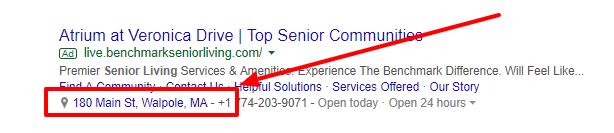
Location assets (formerly location extensions) show your address, hours and a map. Only a community with a physical location can use them, so they set you apart from referral sites.
Use local keywords
Target neighborhood, city and region names, for example “Peabody assisted living” rather than just “assisted living”. Google has reported that 75% of people who find local, helpful information in search results are more likely to visit in person.
Add extra ad assets
Call assets, sitelinks and similar extras give your ad more space and send people straight to the right page. A “Book a Personal Visit” sitelink, for example, can go straight to your tour booking page.

Bid on long-tail keywords
You may never win “assisted living” against a national site’s budget. You can compete on “assisted living communities near Peabody, MA”. More on this in PPC for Senior Living: 7 Google Ads Tips That Turn Clicks Into Tours.
Protect your own name
Run a small branded campaign on your community’s name so you show up first when families search for you specifically.
Part 2: Capture the lead on your own website first
A common and costly pattern: a family visits your website, leaves without contacting you, finds a referral site, and submits an inquiry there. Now the lead belongs to the referral site, even though they found you first.
The answer is conversion rate optimization (CRO): making it easier for visitors to become leads on your site, with a name, email and timestamp in your system before they go anywhere else. These four changes make the biggest difference.
1. Offer something useful as they leave
Exit pop-ups have a bad reputation, but a well-timed, genuinely useful offer works. A guide to choosing a senior living community, or a pricing overview, appears when a visitor is about to leave and asks only for a name and email. That’s enough to record the lead as yours.
2. Embed simple forms on key pages
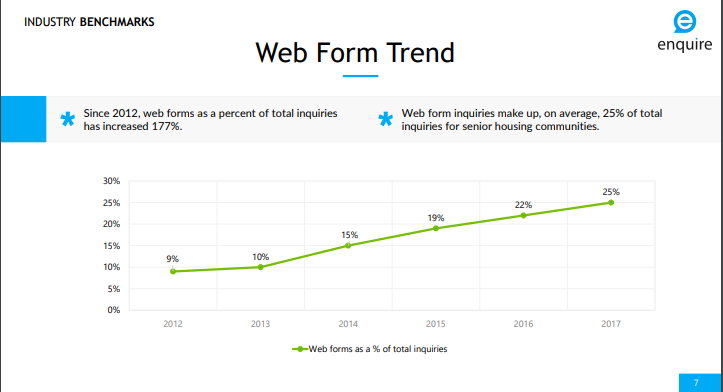
Short forms on your main pages, such as a sidebar tour request or “check availability”, are simple and often overlooked. Enquire data showed web forms growing steadily as a share of senior housing inquiries, at roughly 25% at the time of the study. Keep them short, because every extra field costs you leads.
3. Add website chat
Chat gives families a way to ask a question right away, any time of day, and captures their contact details in the process. In 2026 that might be a live chat team, a chatbot, or an AI assistant that answers common questions and books tours. Whatever you use, make sure chats go straight into your CRM and that a person follows up. A chat tool supports your sales team. It doesn’t replace them.
4. A/B test your landing pages
Small changes to headlines, button text, images and form length can change how well a page converts. Run two versions of a page at the same time, split the traffic, and keep the winner. Then test the next element.
Why this matters for your referral fees
When a family becomes a lead on your website first, you have a timestamped record. If the same family later submits a form on a referral site you partner with, that record helps show the lead was yours. Check your referral agreements for how lead ownership is decided.
None of this removes the need for referral sites overnight, and it doesn’t need to. Find the combination of tactics that works on a small scale, then shift budget gradually toward the channels that produce move-ins at a lower cost.
Key takeaways
- You can’t outspend referral sites, but you can out-local them.
- Use your location, location assets, local keywords and long-tail terms in your ads.
- Run a branded campaign so referral sites don’t sit above your own name.
- Make your website capture the lead first, with useful offers, short forms and chat.
- Test your landing pages and move budget toward what produces move-ins.
Capturing the lead is step one. Calling it back quickly is what turns it into a tour. If you want to see how your own leads compare with your referral leads, book a call with NextWave.
Related reading: How Speed-to-Lead Became the Easiest Unfair Advantage in Senior Living · How to Choose the Best CRM for Senior Living