
Find Out What Revenue May Be Sitting in Your Senior Care CRM
Send a basic lead export. NextWave identifies old leads, stalled opportunities, no-shows, follow-up gaps, and high-priority reactivation segments that may deserve renewed attention.
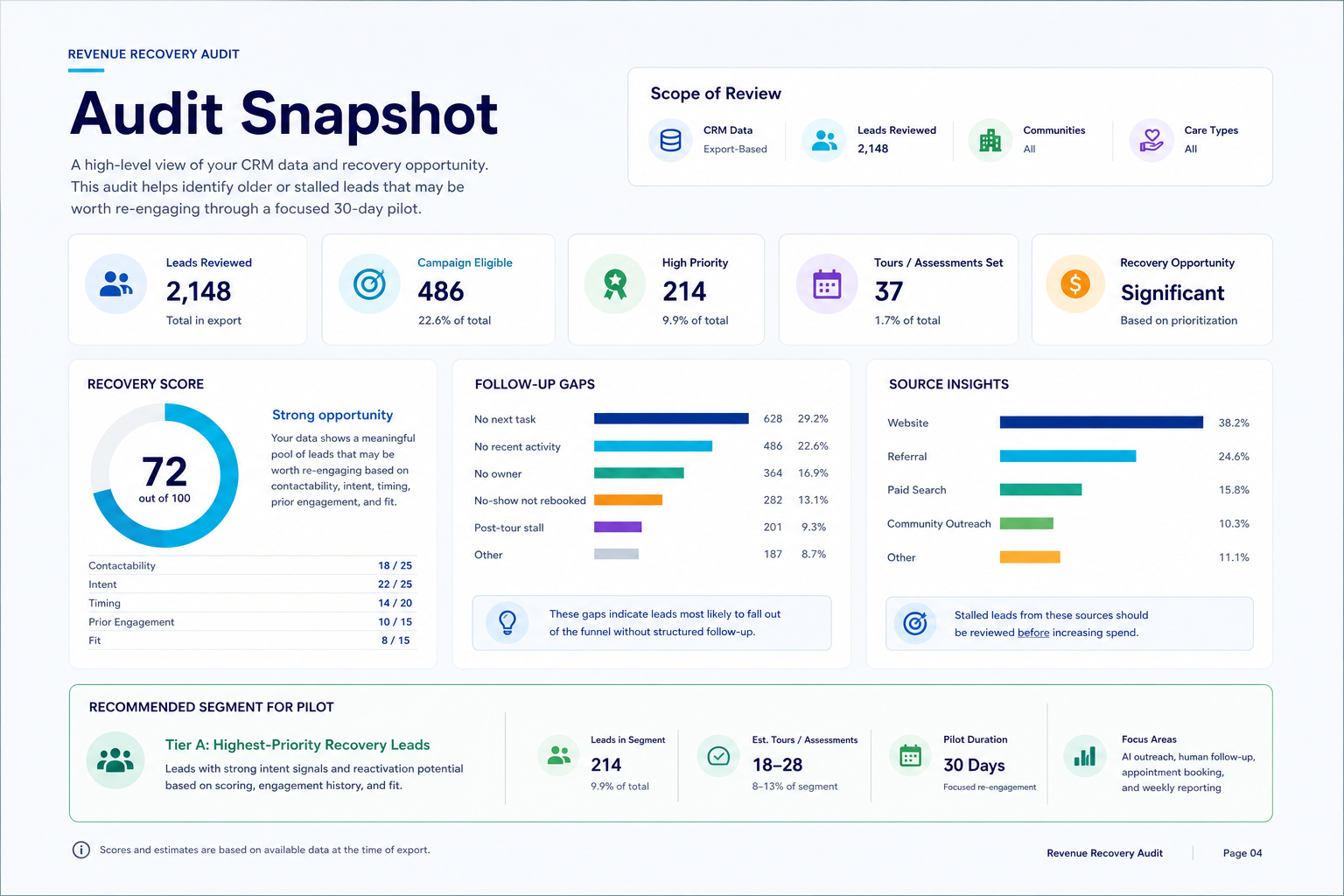
You Already Paid For the Leads. The Question Is Which Ones Are Still Worth Working.
Most senior care teams keep spending on new lead generation while old inquiries, no-shows, stalled tours, missed assessments, and “not yet” families sit inside the CRM.
The audit is built to identify potential revenue leakage and prioritize the contacts most worth reviewing first.
The Report Turns Messy CRM History Into a Practical Recovery Plan
Campaign-Eligible Leads
Leads with valid contact info and enough signal to consider re-engagement.
High-Priority Opportunities
Contacts with stronger intent, timing, prior engagement, or fit.
Follow-Up Gaps
Ownerless leads, no next tasks, stale activity, no-shows, or stalled post-appointment records.
Opportunity Estimate
A conservative planning range to decide whether a pilot is worth testing.
A Basic Export Is Enough to Start
We keep the lift low. At minimum, send these fields. If you can include notes, owner, location, appointment, and activity data too, we will use it to make the scoring sharper.
From Export to Recovery Decision
Send the export
Share a CSV or spreadsheet from HubSpot, Enquire, Sherpa, WelcomeHome, Yardi, MatrixCare, Salesforce, or similar.
Get the report
NextWave scores the data, highlights leakage, and creates a client-ready summary.
Decide on pilot
If the opportunity is meaningful, run a focused 30-day recovery pilot against the best segment.
Turn the Findings Into Booked Conversations
If the audit shows a meaningful recovery pool, NextWave can run a 30-Day Revenue Recovery Pilot using AI-assisted outreach, human follow-up, appointment booking, CRM updates, and weekly reporting.
See What May Be Recoverable in Your CRM
Tell us a little about your company and the old leads you want reviewed. The form is intentionally short; we can ask for the CRM export after we confirm the audit makes sense.
Request your audit
Tell us where your leads live. We will review the request first, then ask for a simple export only if the audit looks like a fit.